Introducing My Garage
We have added a brand new feature to PumpItDown: My Garage. Track the MOT status, road tax, mileage history and insurance dates for every vehicle you own, completely free and without creating an account. Just enter your registration and your full vehicle record appears in seconds.
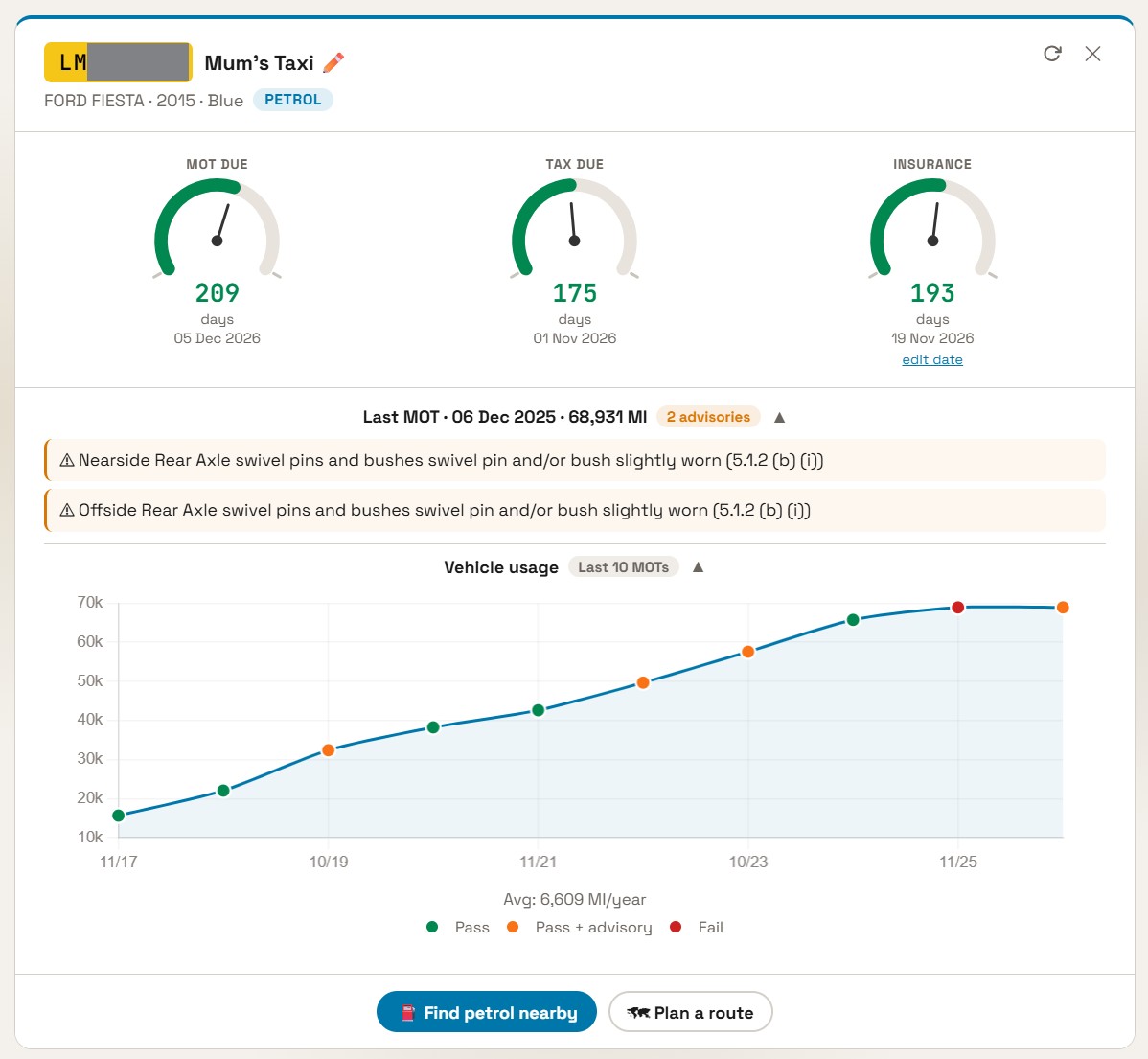
What is My Garage?
My Garage is a free vehicle dashboard built into PumpItDown. Add as many vehicles as you like by entering their UK registration numbers. Each vehicle gets its own card showing you the information that matters most: is the MOT valid, is the road tax paid, when is the next renewal due, and what advisories were flagged at the last test?
There is no account to create, no email address required, and nothing to install. Your vehicles are stored privately on your own device, not on our servers.
Everything you get, at a glance
Pass or fail, expiry date, days remaining, and a clear colour-coded status so you know at a glance if action is needed.
Whether your vehicle is taxed, when it expires, and an alert if the vehicle is declared SORN.
Every advisory and failure item from the most recent MOT, exactly as recorded by the testing centre.
A visual chart of your vehicle's recorded mileage at each MOT test, showing the full usage history over its lifetime.
Set your insurance renewal date and get a clear reminder when it is approaching, stored privately on your device.
Electric and hybrid vehicles are fully supported and correctly identified, with fuel type shown on the card.
How to get started
- Go to pumpitdown.com/Garage or tap "My Garage" in the menu.
- Tap "Add a vehicle" and enter your UK registration number, for example AB12 CDE.
- Your vehicle details appear immediately: make, model, year, colour, fuel type, MOT status, tax status and mileage history.
- Add as many vehicles as you like: family cars, a company van, a motorbike.
- Optionally set your insurance renewal date on each card so you always know when it is due.
That is it. No sign-up, no password, no app download. Just your registrations and your data.
Understanding your MOT advisories
When a vehicle passes its MOT with advisories, those items are recorded as potential problems the tester noticed that are not yet serious enough to cause a failure. Left unaddressed, advisories can develop into full failures at the next test. My Garage displays every advisory from the most recent MOT so you know exactly what to keep an eye on.
Typical advisories look like these:
If your last test had failures as well as advisories, My Garage shows those too, clearly separated so you can see exactly why a previous test was failed.
The mileage history graph
Every MOT test records the vehicle's odometer reading. Over time this builds into a complete mileage history that tells a clear story about how a vehicle has been used. My Garage plots every recorded reading on a graph so you can see the full picture at a glance.
This is particularly useful when buying a used car. If a seller claims a car has done 40,000 miles but the MOT history shows it was already at 60,000 miles three years ago, something does not add up. The graph makes that kind of discrepancy immediately obvious.
Each data point on the graph is also colour-coded to show whether that MOT test was passed or failed, giving you a complete service and condition history in a single view.
Status at a glance
Each vehicle card uses clear colour-coded status pills so you can see the health of every vehicle without reading a single number.
Valid: 245 days MOT is current with plenty of time remaining
Due soon: 28 days MOT is approaching. Time to book.
Expired MOT has lapsed. Driving on public roads is illegal.
The same system applies to road tax. A SORN vehicle is flagged clearly with a separate notice, as driving a SORN vehicle on a public road without valid insurance and tax carries an automatic fine.
Your data stays on your device. My Garage does not require an account and your vehicle list is stored only on your own phone or computer. We do not store, track or share your registration numbers. When you look up a vehicle, only the registration is sent to retrieve the official record. No personal data is collected or retained by PumpItDown.
Who is it for?
My Garage is useful for anyone who owns or manages vehicles in the UK. A few examples of who is already using it:
- 👨👩👧 Families with multiple cars. Track MOT and tax renewals for every vehicle in one place so nothing slips through the cracks.
- 🔑 Private buyers checking a used car. Look up any registration before you hand over money. See the full MOT history, mileage record, and any advisories or failures.
- 🚐 Small business owners with a van or fleet. Keep tabs on every vehicle's compliance status without a subscription or specialist software.
- 👴 Anyone who loses track of renewal dates. Add your insurance date alongside MOT and tax so every deadline is visible in one place.
You do not need to own a vehicle to look it up. Before purchasing any used car, enter the registration in My Garage and review the full MOT history, mileage record and any outstanding advisories. It takes 10 seconds and can save you thousands.
Completely free, no account needed
My Garage is free to use for everyone. There is no premium tier, no subscription and no upsell. Add unlimited vehicles, check them as often as you like, and share the link with anyone who might find it useful.
Because everything is stored on your device, your garage is always available even offline for the vehicle details you have already loaded. The MOT and tax data refreshes when you open the app and you are connected to the internet.